
n8n AI Tweet Automation with OpenAI (2026)
Streamlining Your Social Presence: Exploring n8n AI Tweet Generator Automation 2026
The way businesses and individuals interact on social media is evolving at lightning speed. Staying consistent and engaging can feel like a full-time job. That’s where clever automation comes into play. For those looking to optimize their Twitter strategy, n8n AI tweet generator automation 2026 promises a powerful way to manage content creation and distribution. This post will dive into how this technology works, its potential benefits, and what to consider when implementing it in your workflow.
What is n8n and Why Use it for Social Media?
n8n is a versatile workflow automation platform. Think of it as a digital conductor, orchestrating different apps and services to perform tasks automatically. Its strength lies in its visual interface, allowing users to build complex workflows without extensive coding. This makes it accessible to both technical and non-technical users. Social media automation with n8n opens doors to scheduling posts, repurposing content, and even generating content – all based on predefined rules.
Powering Tweets with AI: The n8n OpenAI Connection
Central to many n8n social media automation workflows is leveraging large language models (LLMs) like those from OpenAI. The integration allows you to use the power of AI to craft compelling tweets. You can feed n8n with data from various sources – blog posts, news articles, product updates – and instruct it to generate tweets tailored to a specific tone and audience. This eliminates writer’s block and dramatically speeds up content creation. One common approach involves using the n8n OpenAI integration to create variations of existing content, making your social media feeds more dynamic.
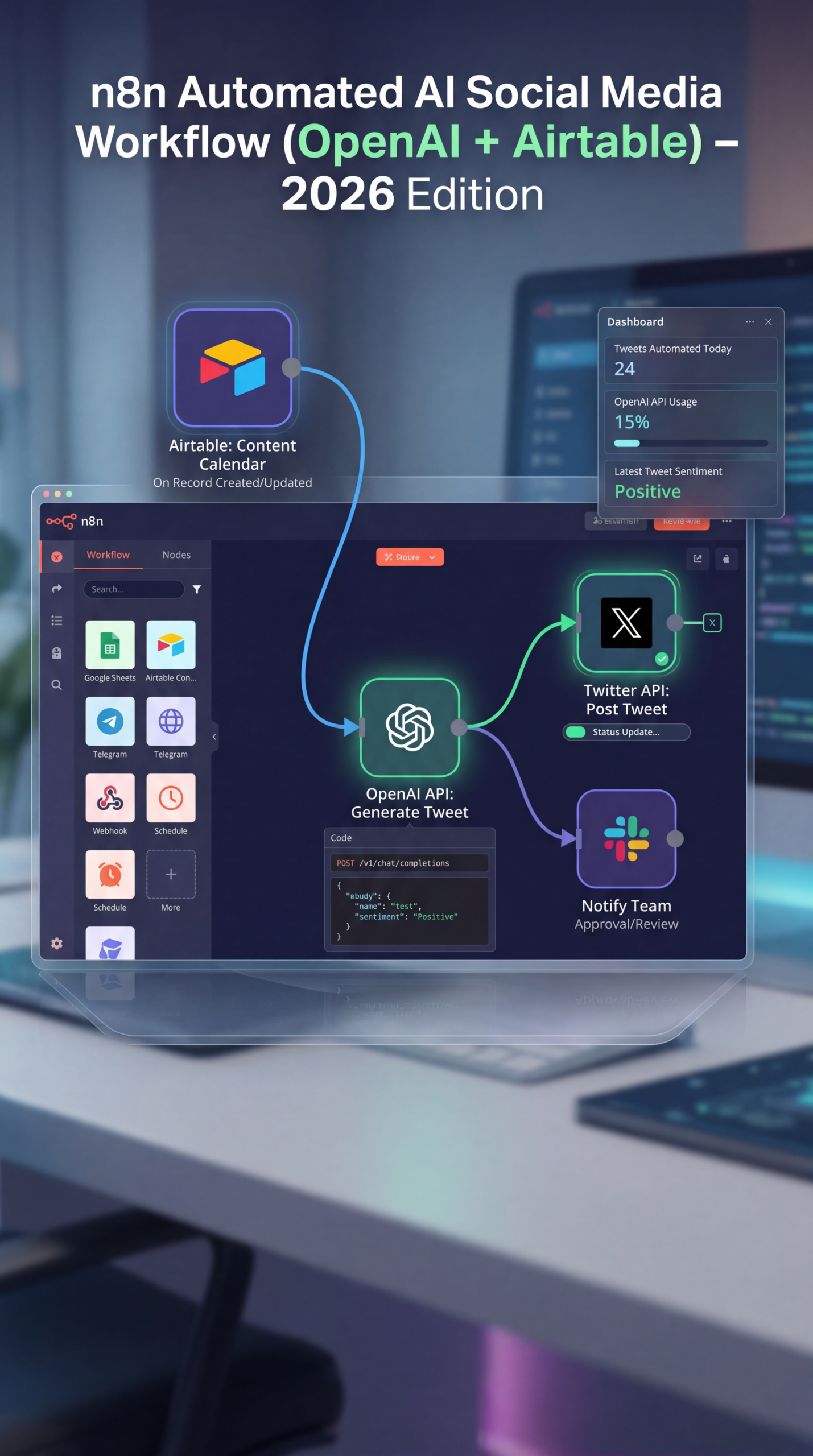
Building Your Automated Tweet Generation Workflow
The core of n8n AI tweet generator automation 2026 lies in constructing a structured workflow. Here’s a breakdown of key steps using n8n.
- Data Source: Identify where your tweet content will originate (e.g., a Google Sheet, a blog RSS feed, a database).
- AI Integration: Use the n8n OpenAI node to send text to an LLM (like GPT-3.5 or newer models). Configure the model’s parameters (e.g., temperature, max tokens) to control the creativity and length of the generated text.
- Tweet Formatting: Add formatting elements—hashtags, mentions, links—to your AI-generated tweets. You can also use n8n’s string manipulation functions to add dynamic content, like timestamps or user IDs.
- Scheduling: Integrate with a social media scheduler (like Buffer, Hootsuite, or directly with the Twitter API) to automatically publish the generated tweets at optimal times.
Airtable Content Automation for Enhanced Efficiency
Combining n8n with Airtable significantly enhances content automation possibilities. Airtable serves as a central repository for your content assets—including blog post summaries, image URLs, and even pre-written tweet templates. Your n8n workflow can then automatically pull information from Airtable, use it to generate new tweets, and schedule them accordingly. This is incredibly useful for content calendars and managing large volumes of social media posts.
Practical Experience & Real Use Case
Let’s say you run a small e-commerce business selling handcrafted goods. You consistently publish new blog posts weekly. Using n8n, you can create a workflow that automatically:
- Fetches the latest blog post title and a short summary from your WordPress blog.
- Sends this information to the n8n OpenAI node, instructing it to create 3 different tweet options.
- Adds relevant hashtags (identified via a predefined list in Airtable).
- Schedules the tweets using Buffer to be published throughout the week.
Common Beginner Mistakes:
- Overly Complex Workflows: Starting with a simple workflow and gradually adding complexity is much better than trying to build a massive system from the outset.
- Ignoring API Rate Limits: The OpenAI API has rate limits. Implementing error handling in your n8n workflow is essential to prevent your automation from breaking.
How to Fix: Start small. Monitor your API usage, and implement retry mechanisms in n8n to handle rate limit errors gracefully.
Limitations and Considerations
While powerful, relying solely on AI for content generation isn’t without its drawbacks. Generated tweets can sometimes lack personality or brand voice. It’s crucial to review and edit the AI-generated content to ensure it aligns with your brand guidelines. Furthermore, overly automated social media can feel impersonal. Balance automation with authentic engagement to avoid alienating your audience.
n8n AI Tweet Generator Automation 2026 vs. Other Options
Here’s a quick comparison:
| Feature | n8n with OpenAI | Dedicated Social Media Automation Tools | Manual Tweet Creation |
|---|---|---|---|
| Automation Level | High | Medium | Low |
| Content Creation | AI-Powered | Limited | Human-Driven |
| Customization | High | Medium | High |
| Cost | Moderate | Variable | Low |
Quick Tip: Generating Catchy Headlines
Need help crafting compelling tweet headlines? Try feeding n8n a list of keywords related to your topic and asking the AI to generate punchy, attention-grabbing taglines.
Frequently Asked Questions
How can n8n help me save time on Twitter management?
n8n automates tasks like scheduling tweets, generating content ideas, and repurposing existing content, freeing up your time for other activities.
What’s the cost of using n8n for social media automation?
n8n is open-source, so the platform itself is free to use. Costs are associated with the services you integrate with, like the OpenAI API and social media scheduling tools.
Is it difficult to set up an automated tweet generation workflow with n8n?
n8n has a visual interface that makes workflow creation relatively straightforward, even without coding experience. However, understanding API integrations and data structures is beneficial.
Can n8n generate tweets in different languages?
Yes, you can use the OpenAI API to generate tweets in various languages by specifying the desired language in your prompts.
What kind of data can I use to train my tweet generation workflow?
You can use a wide variety of data sources, including blog posts, articles, product descriptions, and even customer reviews, to provide context for the AI.
Conclusion
n8n AI tweet generator automation 2026 presents a compelling opportunity to streamline your social media efforts, enhance content creation, and improve engagement. While it’s not a silver bullet, its flexibility and power make it a valuable tool for anyone looking to optimize their Twitter strategy. Experiment with different workflows and AI prompts to discover what works best for your unique needs.
Want to dive deeper into workflow automation? Share your experiences or questions in the comments below! You might also find our guide on [integrating n8n with Airtable](link to internal article) helpful. Or for broader insights into social media strategies, explore our posts on [content calendar best practices](link to internal article).
Share this content:












Post Comment