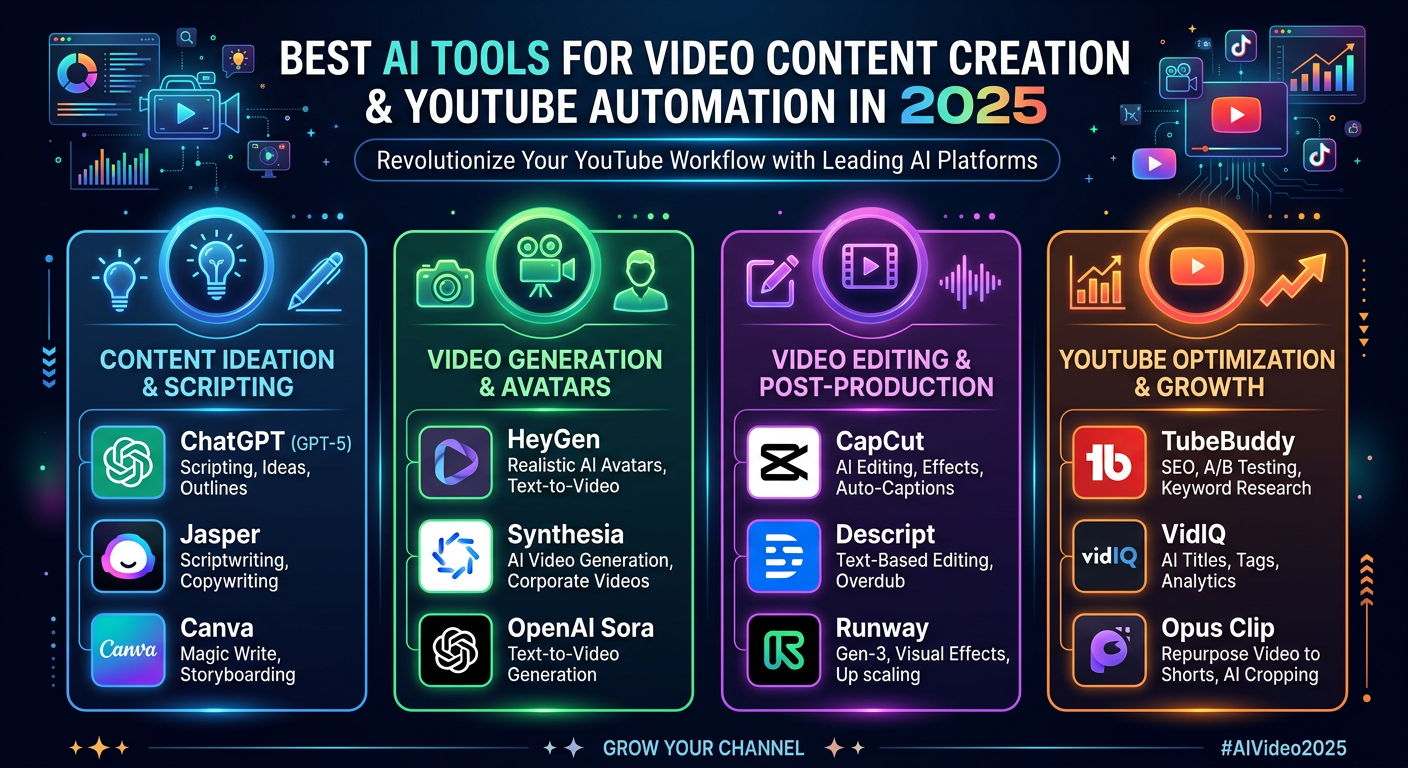
Best AI Tools for Video Content Creation & YouTube Automation in 2025
Level Up Your YouTube Game: The Best AI Tools for Video Content Creation and YouTube Automation in 2025
The video landscape is evolving at warp speed. Creating engaging video content consistently for YouTube can feel like a full-time job. That’s where artificial intelligence steps in. In 2025, the market is brimming with powerful tools to streamline your workflow, boost productivity, and ultimately, grow your audience. This post dives into the top contenders for best ai tools for video content creation and youtube automation in 2025, covering everything from script generation to video editing and channel management.
The Rise of AI in Video Production
For years, video creation demanded significant time, resources, and specialized skills. Now, AI is democratizing the process. These tools aren’t just automating repetitive tasks; they’re empowering creators to focus on strategy, creativity, and audience connection. The advancements in this space are remarkable – the quality of AI-generated content has leaped significantly, making it a viable option for creators of all sizes.
Streamlining Your Pipeline: Key Areas for AI Support
Let’s break down how AI is transforming various stages of your video creation journey:
Scripting and Idea Generation
Staring at a blank screen? AI can help. Several tools use natural language processing to generate video scripts based on your topic, target audience, and desired tone. You simply input a few keywords, and the tool will produce a draft—a great starting point for refining your message.
- Jasper.ai: Excellent for generating long-form content, including video scripts. Offers multiple writing templates and allows for detailed customization.
- Rytr: More affordable option that still delivers quality script ideas and outlines.
- Simplified: Integrates scriptwriting with other design and editing features in a single platform.
Visual Creation and Editing
AI is rapidly changing the face of video editing. Tools now offer features like automated scene detection, background removal, object tracking, and even AI-powered video enhancements.
- Descript: A standout for its transcription-based editing. Edit your video by editing the transcript, making it incredibly fast and intuitive.
- RunwayML: Offers a suite of AI-powered creative tools for video editing, including generative tools and style transfer. Requires a bit of a learning curve but unlocks powerful possibilities.
- Pictory: Specifically designed for turning long-form text (blog posts, articles) into engaging videos. Excellent for repurposing content.
Automating Repetitive Tasks
Time is money. Automating repetitive tasks frees you up to focus on higher-level strategy and creative development.
- TubeBuddy: A comprehensive suite of tools for YouTube channel management, keyword research, and video optimization. Helps you identify trending topics and optimize your videos for search.
- VidIQ: Similar to TubeBuddy, VidIQ offers keyword research, competitor analysis, and video SEO tools.
**Later:** A powerful social media scheduling platform that integrates seamlessly with YouTube, allowing you to schedule video uploads and manage your content calendar.
Practical Experience & Real Use Case
Let’s say you’re a fitness coach looking to create weekly workout videos. Here’s how you could leverage AI tools:
- Content Planning: Use Jasper.ai to generate script outlines for each workout, targeting specific muscle groups.
- Visual Creation: Use Pictory to quickly transform your workout plans into engaging videos using relevant stock footage and visuals.
- Editing: Utilize Descript to edit the videos, removing filler words and adding captions automatically.
- Optimization: Employ TubeBuddy to research relevant keywords and optimize your video titles, descriptions, and tags for maximum visibility.
- Scheduling: Schedule your videos for optimal upload times using Later.
Common Beginner Mistakes & How to Fix Them:
- Over-reliance on AI Output: Don’t just copy and paste! Always review and refine AI-generated content to ensure it aligns with your brand voice and target audience.
- Ignoring SEO: AI can create content, but you still need to optimize it for search. Use keyword research tools to identify relevant keywords and incorporate them into your titles, descriptions, and tags.
- Neglecting Audience Engagement: While automation is valuable, don’t forget to interact with your audience. Respond to comments, ask questions, and foster a community.
Limitations and Drawbacks
While the potential of AI in video creation is immense, it’s not a silver bullet. One limitation is the lack of genuine creativity and emotional depth. AI-generated content can sometimes feel generic or lack a personal touch. Another drawback is the cost of some of these tools. While some offer free trials, a comprehensive suite of features often requires a paid subscription.
AI Video Creation Tools, YouTube Automation AI, AI Video Generator Comparison
| Feature | Descript | Pictory | TubeBuddy | VidIQ |
|---|---|---|---|---|
| Script Editing | Excellent | Limited | Basic | Basic |
| Video Creation | Limited | Excellent | N/A | N/A |
| SEO Tools | Basic | Basic | Excellent | Excellent |
| Automation | Transcription | Text-to-Video | Scheduling | Keyword Research |
| Pricing | Subscription | Subscription | Free/Paid | Free/Paid |
Quick Answer
What’s one major benefit of using AI tools for YouTube? AI tools dramatically reduce the time and effort required to create high-quality video content, allowing you to scale your channel more effectively and focus on engaging with your audience.
The Future is Now
The integration of best ai tools for video content creation and youtube automation in 2025 is no longer a futuristic concept; it’s a present-day reality. As AI technology continues to advance, we can expect even more sophisticated tools to emerge, further empowering creators to tell their stories and connect with audiences around the world.
Frequently Asked Questions
How can AI help me with YouTube SEO in 2025?
AI-powered tools like TubeBuddy and VidIQ analyze keyword trends, suggest optimal tags, and help you optimize your video descriptions, leading to improved search rankings.
Are AI video generators expensive?
The cost varies significantly. Some tools offer free plans with limited features, while more advanced capabilities require paid subscriptions, ranging from $20 to $200+ per month.
What role does human creativity still play in AI video creation?
Human creativity remains essential. AI generates content, but you need to curate, refine, and personalize it to align with your brand voice and connect with your audience authentically.
Which AI tool is best for repurposing blog content into videos?
Pictory is particularly well-suited for this task, as it specializes in turning written content into engaging video formats quickly and efficiently.
Ready to revolutionize your YouTube content creation? Share your thoughts and favorite AI tools in the comments below!
Share this content:








Post Comment