
TRC20 Wallet Tracking with n8n (2026 Guide)
Master Your Crypto Holdings: Unleashing TRC20 Wallet Tracker n8n Automation 2026
The world of crypto moves at an unprecedented pace. Keeping tabs on your investments, especially across various networks, can feel like a full-time job. For anyone dealing with USDT on the Tron network, manual checking is not only time-consuming but also prone to oversight. This is where the power of workflow automation steps in, offering a game-changer for monitoring your digital assets. Today, we’re diving deep into how a TRC20 wallet tracker n8n automation 2026 can revolutionize your approach to asset management, providing real-time insights and peace of mind.
Imagine getting instant notifications for incoming transfers, seeing your portfolio rebalance automatically, or even triggering smart contract interactions based on specific TRC20 token movements. This isn’t just wishful thinking; it’s the tangible reality that n8n, combined with the right approach, brings to the table for proactive investors and busy professionals alike.
Why Automation is Crucial for TRC20 Wallet Monitoring
In the volatile landscape of crypto, information is currency. Delays in recognizing transactions can lead to missed opportunities or, worse, a delayed response to critical events. The Tron network, with its low fees and high transaction speeds, is a popular choice for stablecoins like USDT. However, manually monitoring multiple TRC20 addresses through explorers like TronScan can quickly become burdensome.
Traditional methods involve refreshing pages or setting up basic email alerts that often lack the granularity and customizability needed for serious investors. The sheer volume of data, coupled with the need for immediate action in certain scenarios, makes robust automation solutions indispensable. This isn’t just about convenience; it’s about competitive advantage and risk mitigation in a market that never sleeps.
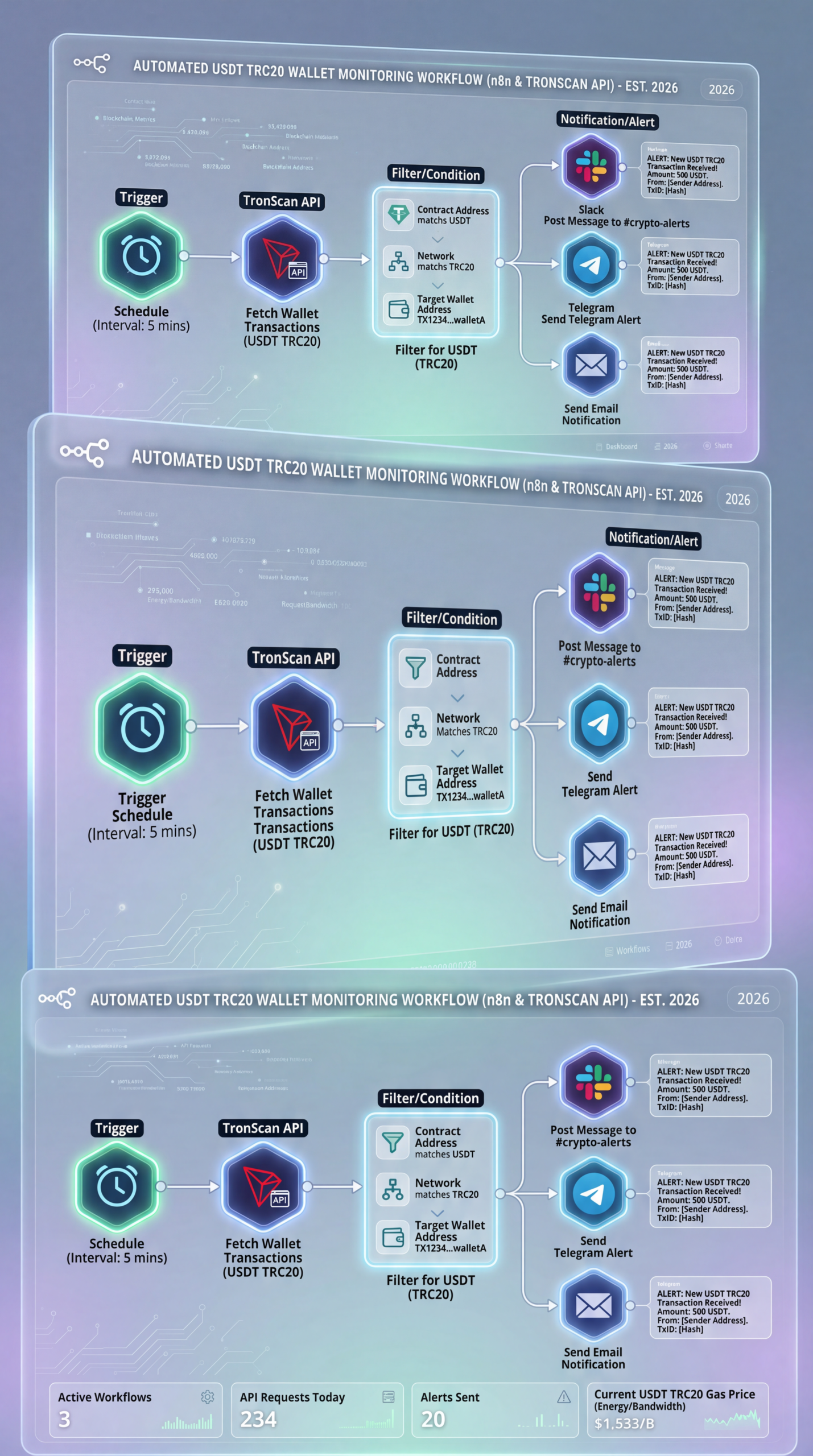
Building Your TRC20 Wallet Tracker n8n Automation 2026 Workflow
So, how do we actually build this magical monitoring system? The core of our solution lies in n8n, an open-source automation platform that connects various services and APIs with incredible flexibility. The beauty of n8n is its visual workflow builder, making complex integrations surprisingly accessible.
Key Components for Effective Tracking:
- Trigger Node: This is where your workflow starts. For real-time monitoring, a “Cron” node for scheduled checks or a “Webhook” node for event-driven updates (if your data source supports callbacks) are common choices.
- Data Source Node: To track TRC20 transactions, you’ll primarily interact with a Tron blockchain explorer API. TronScan offers a robust API that allows querying wallet balances, transaction histories, and specific token movements. This is where USDT TRC20 tracking n8n, TronScan API automation, crypto wallet monitoring workflow 2026, n8n blockchain automation, TRC20 transaction alerts truly shines.
- Logic Nodes: These nodes (e.g., “IF,” “Switch,” “Filter”) help you define conditions. For instance, “If the transaction amount is greater than $1,000,” or “If the transaction is incoming and for a specific TRC20 token.”
- Action Nodes: Once your conditions are met, these nodes perform actions. This could be sending an email, a Telegram message, updating a Google Sheet, logging to a database, or even triggering another workflow for more complex tasks.
The power lies in chaining these elements together, custom-tailoring a monitoring system that fits your exact needs.
Practical Experience & Real Use Case: Setting Up Your First TRC20 Wallet Tracker n8n Automation 2026
Let’s walk through a common scenario: you want to be notified every time your main TRC20 USDT wallet receives a deposit above $500.
- Start with the Schedule: In n8n, add a “Cron” node to run every 5 minutes. This sets the frequency of your checks.
- API Call to TronScan: Add an “HTTP Request” node. Configure it to call the TronScan API (e.g.,
https://apilist.tronscan.org/api/transaction?sort=-timestamp&count=true&limit=10&start=0&address=[YOUR_WALLET_ADDRESS]). You’ll need to parse the JSON response. - Filter for New Deposits: Use an “IF” node to check two main conditions:
- Is the current transaction’s timestamp newer than the last checked timestamp (to avoid duplicate alerts)? This is a common beginner mistake – without state management (saving the last successful timestamp), you’ll get spammed every time. A simple fix is to store the last processed
transaction_idortimestampin a small database or even a Google Sheet accessible by n8n. - Is the
toaddress your wallet address? (Ensuring it’s an incoming transaction). - Does the
tokenInfo.tokenAbbrequal “USDT”? - Is the
amount(after appropriate division bytokenInfo.tokenDecimal) greater than 500?
- Is the current transaction’s timestamp newer than the last checked timestamp (to avoid duplicate alerts)? This is a common beginner mistake – without state management (saving the last successful timestamp), you’ll get spammed every time. A simple fix is to store the last processed
- Send an Alert: If all conditions pass, add a “Telegram” node (or email, Slack, etc.) to send a notification with the transaction details (sender, amount, link to TronScan).
Common Beginner Mistake: Not handling token_decimal correctly. Many tokens have 6 or 18 decimals. The API typically returns the raw amount. Dividing by 10^token_decimal is crucial to get the human-readable value. For example, USDT (TRC20) generally has 6 decimals, so a raw amount of 500000000 is actually 500 USO$. Forgetting this leads to wildly inaccurate readings.
The Limitations of Automated TRC20 Wallet Tracking
While powerful, it’s important to understand the boundaries. Relying solely on a TRC20 wallet tracker n8n automation 2026 has its limitations.
- API Rate Limits: Free and even some paid API tiers from blockchain explorers have rate limits. Hitting these will interrupt your monitoring. You might need to add delay nodes or upgrade your API plan for high-frequency tracking.
- Decentralization vs. Centralized APIs: You’re still relying on a centralized API provider (like TronScan) for data. While generally reliable, an outage on their end would temporarily blind your tracker. For ultimate decentralization, you’d run your own Tron node, which is a significantly more complex undertaking.
- Security for Private Keys: Never, ever, store your private keys or seed phrases within n8n or any automation platform unless it’s specifically designed for secure key management and you fully understand the risks. Our automation focuses on monitoring public addresses, not initiating transactions from them.
- Complexity Creep: As you add more conditions and integrations, workflows can become complex. Good documentation within n8n and disciplined naming conventions are crucial for maintainability.
| Feature | n8n TronScan API Automation | Manual TronScan Monitoring | Exchange-Native Notifications |
|---|---|---|---|
| **Real-time Alerts** | Excellent (customizable, multi-channel) | Poor (manual refresh, basic email) | Good (deposit/withdrawal based) |
| **Customizable Logic** | High (IF/THEN, multi-step) | None | Limited (pre-defined by exchange) |
| **Multi-Wallet Tracking** | Excellent (easy to add multiple addresses) | Moderate (many tabs/refreshes) | Poor (requires logging into multiple exchanges) |
| **Integration with Other Tools** | Excellent (email, Telegram, databases, spreadsheets) | None | Limited (primarily within exchange ecosystem) |
| **Technical Skill Required** | Moderate (understanding APIs, n8n logic) | Low (basic web browsing) | Low (app usage) |
| **Cost** | Free (self-hosted) to Moderate (cloud-hosted) | Free | Free (built into exchange service) |
Frequently Asked Questions
What is the core benefit of TRC20 wallet tracker n8n automation 2026?
The core benefit is real-time, customizable alerts and automated actions based on specific TRC20 token movements, offering significant efficiency and control over manual monitoring.
Can I monitor multiple TRC20 wallets with n8n?
Yes, n8n can easily be configured to monitor multiple TRC20 wallet addresses within a single workflow or across several, depending on your needs.
Is it safe to automate my crypto wallet tracking with n8n?
It is safe for monitoring public wallet data. However, never expose private keys or seed phrases within n8n workflows; focus solely on tracking publicly available transaction information.
How often can n8n check for new TRC20 transactions?
Using a Cron job, n8n can check for new transactions as frequently as every minute, though practical considerations like API rate limits often necessitate longer intervals.
The Future is Automated
As we look towards 2026, the convergence of social media trends, sophisticated AI tools, and seamless automation will redefine how we interact with financial markets. Whether it’s managing stock portfolios with advanced sentiment analysis, exploring alternative investment strategies like tokenized real estate, or simply keeping a finger on the pulse of your crypto holdings, automation is no longer a luxury but a necessity. A robust TRC20 wallet tracker n8n automation 2026 solution is a prime example of leveraging these tools for greater financial enlightenment and control.
For those ready to move beyond manual checks and embrace a more proactive approach to their TRC20 assets, diving into n8n is a highly rewarding endeavor. It equips you with the tools to not just observe the market, but to interact with it intelligently and efficiently.
What are your biggest challenges in managing your crypto portfolio? Share your thoughts in the comments below, or explore our guides on advanced social media automation for market sentiment analysis or leveraging AI agents for stock market predictions to further supercharge your investment strategies!
Share this content:










Post Comment