
Shopify Order Automation with n8n (2026)
Streamlining Your Shopify Operations: Mastering the Shopify order automation workflow n8n 2026
Running a successful e-commerce business on Shopify demands efficiency. Juggling order fulfillment, inventory management, customer communication, and marketing can quickly become overwhelming. Enter Shopify order automation workflow n8n 2026, a powerful tool gaining traction among entrepreneurs and businesses aiming to optimize their operations. This blog post dives deep into leveraging this automation approach, exploring its benefits, practical implementation, potential limitations, and how it stacks up against other solutions. We’ll cover setting up workflows, navigating common pitfalls, and understanding its future role in e-commerce.
What is Shopify Order Automation with n8n?
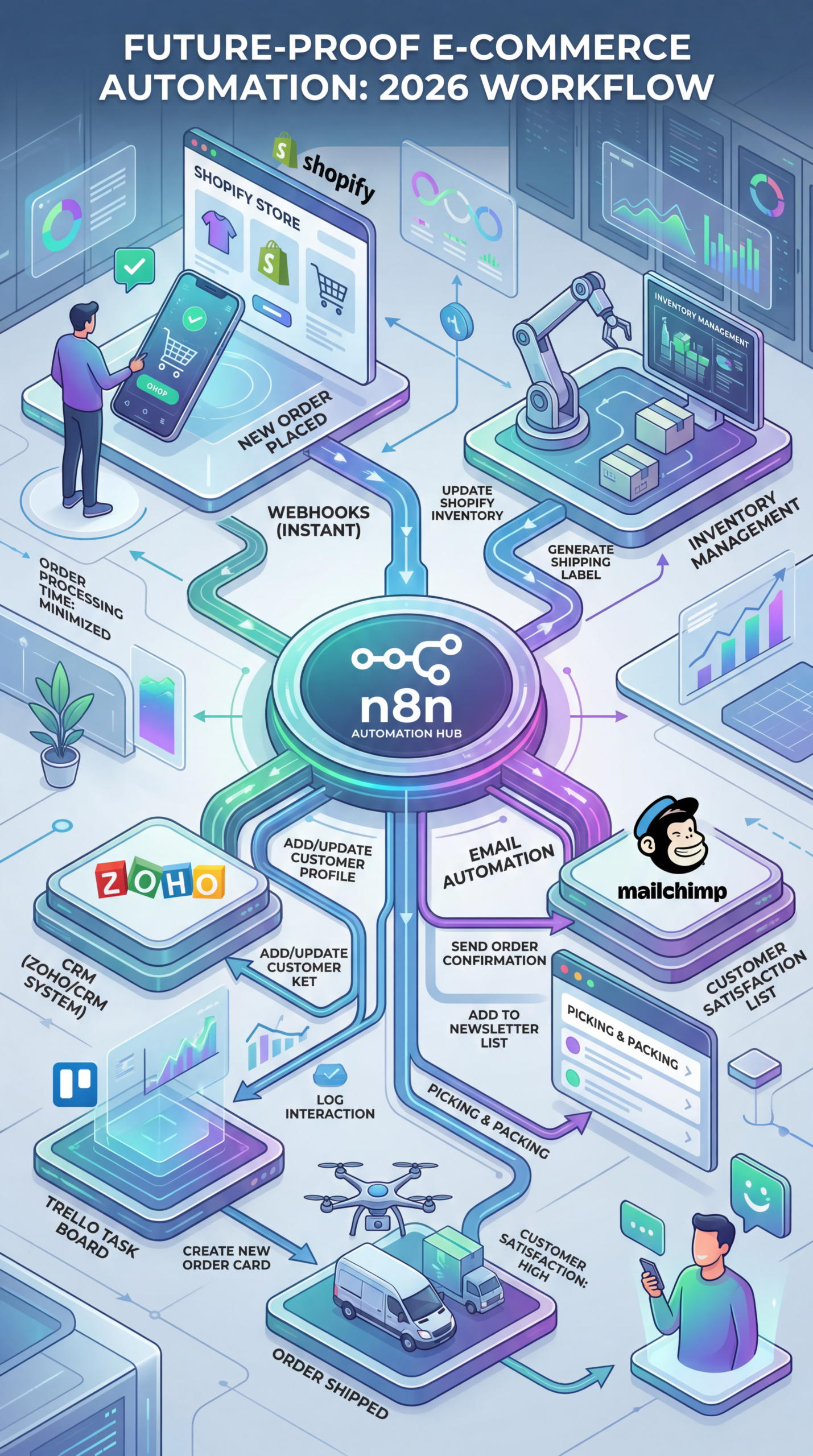
At its core, Shopify order automation workflow n8n connects your Shopify store with other applications to automate repetitive tasks. Instead of manually processing orders, updating inventory, or sending follow-up emails, you create automated workflows that trigger actions based on specific events. n8n, the platform powering this automation, excels in its flexibility and low-code approach. Unlike rigid, all-in-one platforms, n8n offers a visual interface where you can build custom workflows without extensive coding knowledge. This adaptability makes it a popular choice for businesses with unique needs.
Why Automate Your Shopify Order Processing?
The benefits of implementing a Shopify order automation workflow are significant:
- Time Savings: Automate manual tasks, freeing up your time to focus on strategic initiatives.
- Reduced Errors: Minimize human error in order processing and data entry.
- Improved Customer Experience: Provide faster shipping updates and personalized communication.
- Increased Efficiency: Streamline your entire order fulfillment process, leading to greater productivity.
- Scalability: Easily handle increased order volumes without adding significant manual labor.
Building Your Shopify Automation Workflow: A Step-by-Step Guide
Setting up a Shopify order automation workflow n8n involves several key steps:
- Connect Shopify and Other Apps: n8n uses webhooks to trigger workflows. You’ll need to connect your Shopify store and other applications via their respective n8n integrations. This might involve providing API credentials. For example, integrating with a shipping provider to automatically generate shipping labels after an order is placed.
- Define Your Workflow Trigger: This is the event that starts your automation. For a typical order automation workflow, the trigger would be a new order created in Shopify.
- Design Your Workflow: Using n8n’s visual interface, create a sequence of actions. Common actions include:
- Retrieving order details from Shopify.
- Updating inventory levels.
- Creating shipping labels.
- Sending order confirmation emails.
- Triggering notifications in Slack or other communication platforms.
- Test and Deploy: Thoroughly test your workflow with sample orders to ensure it functions as expected. Once you’re confident, deploy it to run automatically.
- Monitor and Refine: Regularly monitor your workflows for errors or inefficiencies and make adjustments as needed.
Practical Experience & Real Use Case
Let’s consider a common scenario: automating the entire order fulfillment process.
Scenario: A small online clothing boutique wants to automate the process of sending order confirmation emails, updating inventory, and creating shipping labels.
Workflow Steps:
- Trigger: A new order is placed in Shopify.
- Action 1: Retrieve order details (customer name, shipping address, items ordered) from Shopify.
- Action 2: Send a personalized order confirmation email to the customer using SMTP (e.g., Gmail, SendGrid).
- Action 3: Update Shopify inventory levels for the purchased items.
- Action 4: Send order information to a shipping provider API (e.g., Shippo, EasyPost) to generate a shipping label.
- Action 5: Update the order status in Shopify to “Shipped.”
Common beginner mistakes and how to fix them:
- Incorrect API Credentials: An incorrect API key or password will prevent connections. Double-check the credentials and ensure they are up-to-date.
- Misconfigured Data Mapping: Failing to correctly map data fields between Shopify and other apps can lead to errors. Carefully review the data mapping within n8n.
- Ignoring Error Handling: Without proper error handling, a workflow can fail silently. Implement error handling steps to capture and address any issues.
Limitations and Drawbacks of n8n for Order Automation
While powerful, Shopify order automation workflow n8n 2026 isn’t a perfect fit for every business.
- Learning Curve: n8n has a learning curve, especially for users unfamiliar with workflow automation concepts.
- Maintenance: Workflows require ongoing maintenance to ensure they function correctly and adapt to changes in Shopify or integrated apps.
- Complexity: Complex workflows can become difficult to manage and debug. Consider breaking down complex processes into smaller, more manageable workflows.
- Cost: While n8n has a community edition, advanced features and higher usage volumes often necessitate a paid plan.
n8n vs. Other Automation Tools: A Comparison
| Feature | n8n | Zapier | Make (formerly Integromat) |
|---|---|---|---|
| Coding Required | Low-code (visual interface) | No code | Low-code (visual interface) |
| Pricing | Community (free), Paid Plans | Subscription-based | Subscription-based |
| Complexity | Moderate to High | Low to Moderate | Moderate to High |
| Customization | Highly Customizable | Limited Customization | Highly Customizable |
| Use Cases | Complex workflows, API integrations | Simple integrations, basic automation | Complex workflows, API integrations |
Quick Answer: What is the most crucial element for a successful Shopify order automation workflow n8n 2026 setup?
Clear data mapping and robust error handling are vital. Without precise data connections and proactive error management, your automated processes will quickly break down, leading to inaccurate information and frustrated customers.
The Future of Shopify Order Automation with n8n
As e-commerce continues to evolve, automation will become even more critical. The trend towards hyper-personalization, omnichannel experiences, and real-time data analysis will drive demand for sophisticated automation solutions. n8n’s flexibility and open-source nature position it well to meet these challenges. Expect to see increased integration with AI-powered tools for tasks like predictive inventory management and personalized customer communication.
Frequently Asked Questions
Does setting up a Shopify order automation workflow n8n require coding skills?
No, n8n utilizes a visual, low-code interface, minimizing the need for extensive coding. While some technical understanding is helpful, most workflows can be built using drag-and-drop functionality and pre-built modules.
How does n8n integrate with shipping providers?
n8n integrates with shipping providers like Shippo and EasyPost through their respective APIs. You’ll need to configure your API credentials within n8n to enable the connection and automate label generation.
Is automating order processing with n8n secure?
Yes, n8n prioritizes security. It uses secure connections (HTTPS) and allows for secure storage of API credentials. However, it’s crucial to follow best practices for API key management.
Ready to unlock the power of automation for your Shopify store? Share your thoughts, experiences, or questions in the comments below! And be sure to check out more resources on optimizing your e-commerce business.
Share this content:












Post Comment