
Track ISS with n8n and BigQuery Automation 2026
Tracking Satellites with n8n and BigQuery: Building Your 2026 Automation Pipeline
The ability to automatically ingest and analyze real-time satellite data is rapidly becoming invaluable across various industries, from environmental monitoring to logistics. This article delves into the practicalities of n8n ISS tracker to BigQuery automation 2026, exploring how you can build a robust workflow to capture International Space Station (ISS) location data and store it efficiently in Google BigQuery. We’ll cover the essential steps, potential challenges, and considerations for implementing this powerful data pipeline. Understanding how to leverage automation for such data is a key skill for anyone looking to gain a competitive edge in data-driven decision-making.
Why Automate ISS Tracking with BigQuery?
The ISS constantly orbits our planet, providing a wealth of data relevant to scientific research and technological advancements. Traditionally, accessing and analyzing this data involved manual downloads and complex processing. However, with the rise of accessible APIs and powerful automation tools like n8n, this process can be streamlined. Storing this data in Google BigQuery offers significant advantages:
- Scalability: BigQuery can handle massive datasets effortlessly, making it ideal for long-term tracking of the ISS.
- Performance: Its columnar storage and query engine enable rapid analysis of spatial and temporal data.
- Cost-effectiveness: BigQuery’s pay-as-you-go model can be very economical, especially for intermittent data ingestion.
- Integration: BigQuery seamlessly integrates with other Google Cloud services and various data visualization tools.
Building a n8n Workflow for ISS Location Updates
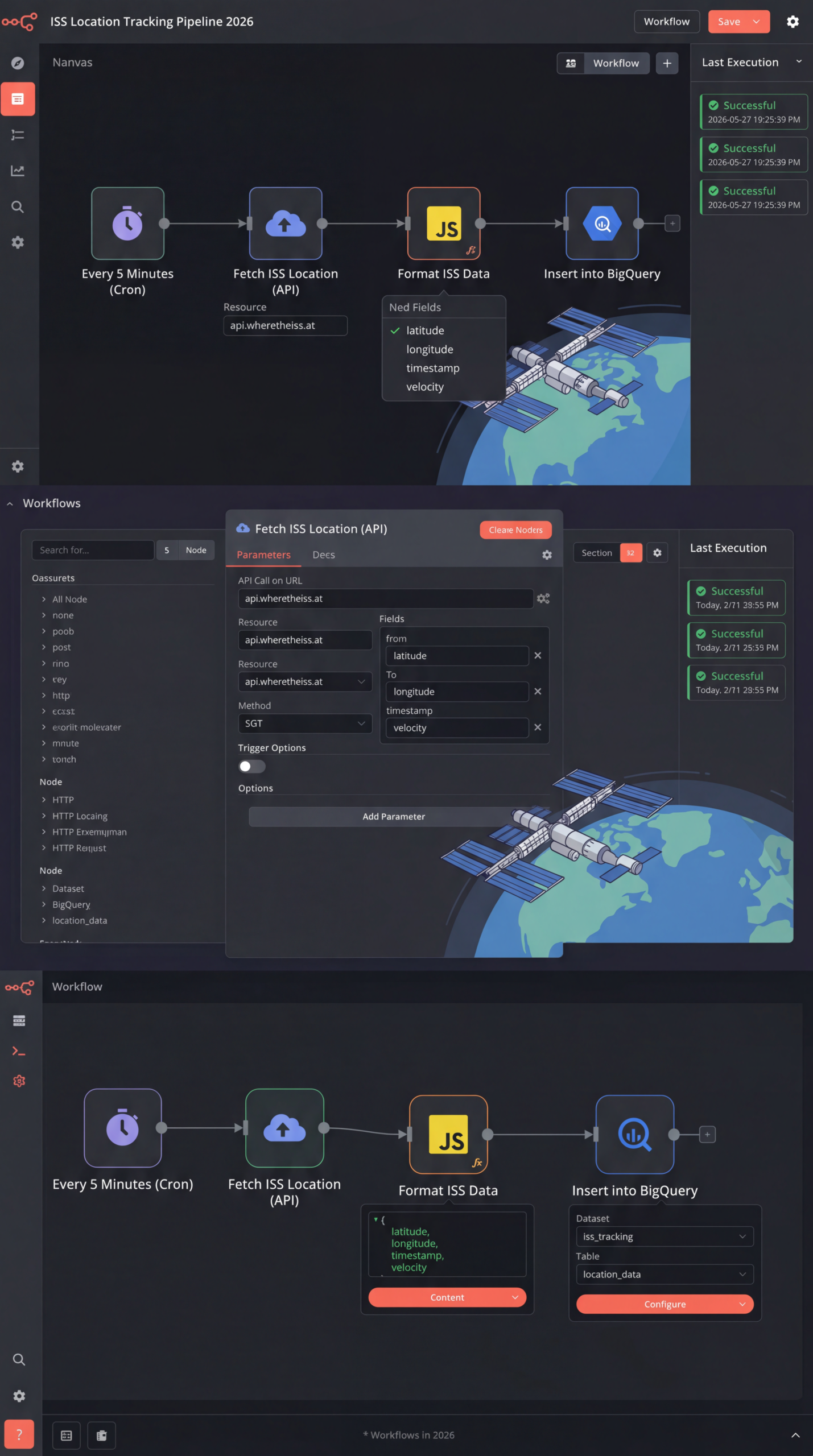
The core of our automation lies in creating an n8n workflow that periodically fetches ISS location data from a relevant API and then loads it into BigQuery. Here’s a step-by-step breakdown:
- Choose an API: Several APIs provide ISS tracking data, including those from space agencies or third-party providers. Research and select an API that meets your data requirements and offers a stable, reliable endpoint.
- HTTP Request Node: In n8n, use the HTTP Request node to periodically query the chosen API. Configure the node with the API endpoint, authentication details (if required), and any necessary parameters. You’ll likely want to set up a cron schedule for regular updates.
- Data Parsing: The API response will typically be in JSON format. Use the JSON node in n8n to parse the data and extract the relevant fields like latitude, longitude, altitude, and timestamp.
- BigQuery Node: Utilize the n8n BigQuery node to connect to your Google BigQuery project. Configure the node with your BigQuery connection details and the table name where you want to store the data.
- Data Transformation (Optional): Before storing the data, you might need to transform it to match the schema of your BigQuery table. The Function node in n8n can be used for data manipulation and formatting.
Practical Experience & Real Use Case
Let’s imagine a scenario where a research team needs to track the ISS trajectory for atmospheric studies. They can set up an n8n ISS tracker to BigQuery automation 2026 workflow to capture daily updates.
Common Beginner Mistakes:
- Incorrect API Credentials: Forgetting or entering incorrect API keys is a frequent pitfall. Fix: Double-check your credentials and ensure they are valid.
- Ignoring Rate Limits: APIs often have rate limits to prevent abuse. Fix: Implement delays or throttling mechanisms in your n8n workflow to avoid exceeding these limits.
- Schema Mismatches: If the API response format doesn’t match your BigQuery table schema, data loading will fail. Fix: Carefully inspect the API response and transform the data accordingly using the Function node.
A typical workflow might run every hour, pulling data for the past hour and appending it to the BigQuery table. Over time, this would create a comprehensive historical record of the ISS’s movements. This data could then be used to build visualizations, perform statistical analysis, or integrate with other datasets.
Limitations and Considerations
While powerful, this approach isn’t suitable for all situations.
- API Reliability: Relying on external APIs introduces a dependency on their availability and stability. Service disruptions can interrupt your automation.
- Data Cost: Some APIs may charge for data usage, which can become significant for high-frequency data ingestion. Carefully review the API’s pricing model.
- Data Volume: While BigQuery is scalable, extremely high data volumes might require optimization of your workflow and query patterns.
Competitive Analysis: n8n vs. Other Automation Platforms
| Feature | n8n | Zapier | Make (Integromat) |
|---|---|---|---|
| Ease of Use | Moderate, visual workflow builder | Very easy, drag-and-drop interface | Moderate, visual workflow builder |
| Pricing | Open-source core, paid for features | Subscription-based, per-task | Subscription-based, per-task |
| Data Transformation | Powerful Function node | Limited transformation capabilities | Robust transformation capabilities |
| Community Support | Active community, extensive documentation | Large community, extensive documentation | Growing community, good documentation |
| Cost-Effectiveness | Potentially lower for complex workflows | Can become expensive for high volume | Competitive pricing for power |
A Quick Answer: What’s the Best Time to Run the n8n Workflow?
The ideal time to run your n8n ISS tracker to BigQuery automation 2026 workflow depends on your analytical needs. For near real-time tracking, hourly or even more frequent updates might be suitable. For historical analysis, a daily or even less frequent schedule could be sufficient.
Frequently Asked Questions
How do I find an API that provides ISS location data?
Several space agencies (like NASA) and third-party providers offer APIs. Search for “ISS tracking API” to find a list of options and compare their features and pricing.
What kind of data can I store in BigQuery?
You can store various attributes, including latitude, longitude, altitude, velocity, timestamp, and potentially other data points depending on the API you choose.
Is n8n free to use for this purpose?
n8n has an open-source core that is free to use. However, you might need a paid plan for increased usage limits and access to advanced features.
How often should I run the automation?
The frequency depends on your needs. Hourly updates are common for tracking near real-time movements, while daily updates might suffice for historical analysis.
Conclusion
Implementing an n8n ISS tracker to BigQuery automation 2026 workflow empowers you to harness the valuable data from the International Space Station. By automating data ingestion and storage, you can unlock new insights and drive informed decisions. While there are considerations regarding API reliability and data costs, the benefits of scalability and efficient analysis make this a powerful strategy for various applications.
Ready to dive deeper into data automation? Share your thoughts or questions in the comments below! You might also find our guide to n8n ISS location tracking workflow, store API data in Google BigQuery with n8n, ISS satellite tracking automation 2026, n8n cron HTTP request BigQuery integration, automated satellite data pipeline n8n helpful.
Share this content:













Post Comment