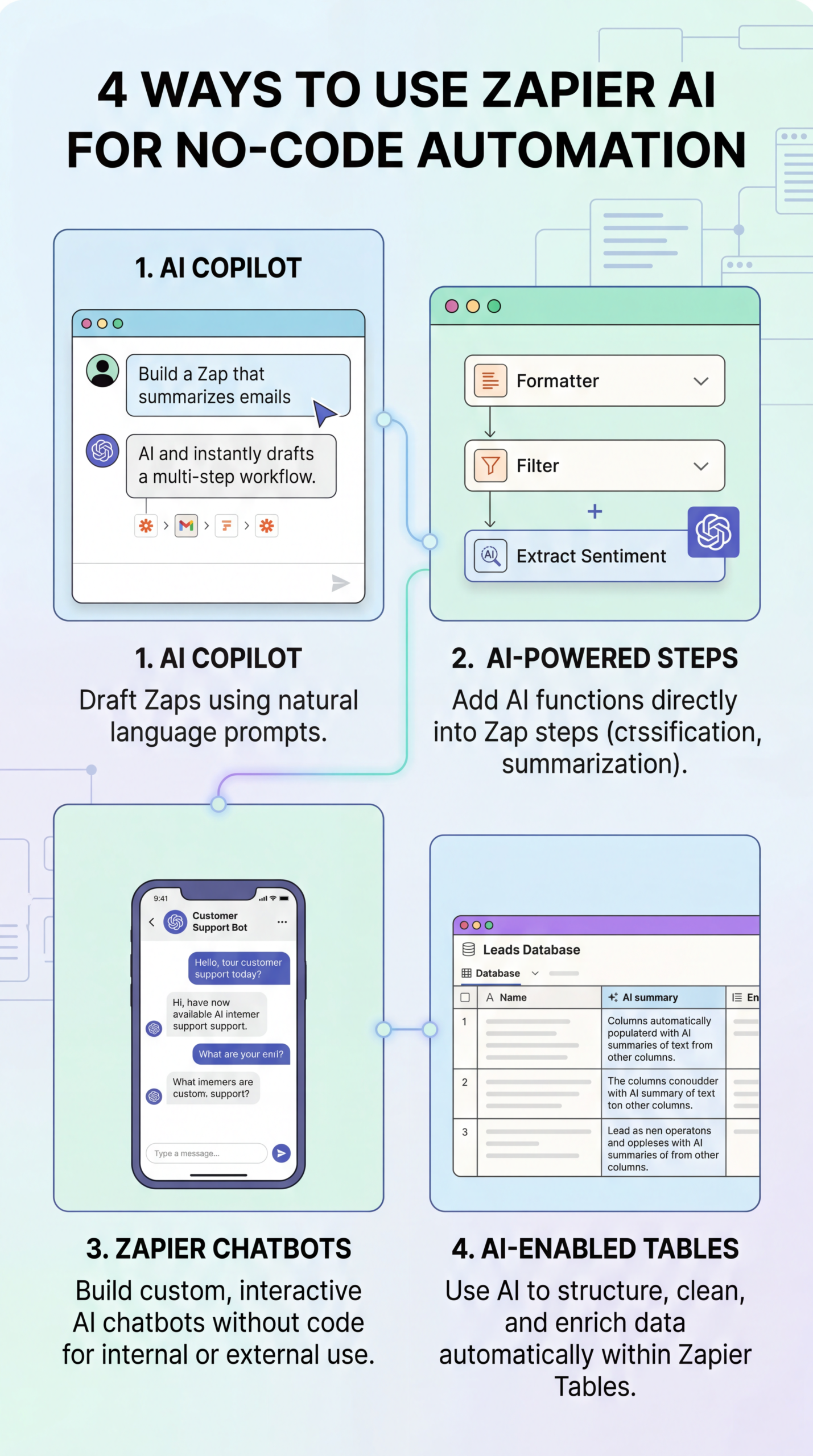
How to Use Zapier AI Features to Automate Business Workflows Without Coding
Streamline Your Business: Mastering Workflow Automation with AI in Zapier
Feeling overwhelmed by repetitive tasks that eat into your valuable time? You’re not alone. Many entrepreneurs and small business owners spend countless hours on manual processes that could be automated. The good news? You don’t need to be a coding expert to reclaim your time and boost productivity. This guide will show you how to use zapier ai features to automate business workflows without coding, unlocking a new level of efficiency for your business. We’ll explore practical applications, address potential limitations, and provide insights to help you leverage this powerful technology.
What are Zapier AI Features and Why Should You Care?
Zapier has evolved significantly, and its integration of artificial intelligence (AI) is a game-changer. These AI features empower you to go beyond simple trigger-action workflows, enabling more sophisticated and dynamic automation. Instead of rigid rules, you can utilize AI to understand and process information, making your workflows far more adaptable and intelligent. Think of it as adding a brain to your automation – one that can learn and adjust. This allows you to automate tasks previously requiring human intervention, freeing you up for strategic initiatives. The core goal is to reduce manual effort and focus on higher-value activities within your business.
Supercharging Your Workflows with Intelligent Automation
The beauty of Zapier’s AI capabilities lies in their versatility. Here’s a deeper dive into some key features and how they can transform your business:
- Text Summarization: Condense lengthy documents or email threads into concise summaries. This is invaluable for quickly grasping key information without spending hours reading. Imagine automatically generating executive summaries of customer feedback or project reports.
- Content Generation: Create marketing copy, social media posts, or even basic email drafts. This tool can provide a starting point, saving you time and boosting creative output. It’s especially helpful for generating variations of content for A/B testing.
- Data Extraction: Pull specific data points from unstructured text, such as invoices, contracts, or customer reviews. This eliminates manual data entry, reducing errors and freeing up valuable time.
- Image Intelligence: Analyze images to extract information, such as product details from a photo or identifying objects and scenes for automated tagging.
Practical Experience & Real Use Case
Let’s consider a real-world scenario: automating customer support responses. A common pain point for small businesses is responding to frequently asked questions (FAQs).
The Problem: You receive numerous emails asking the same questions. Manually typing out responses is time-consuming and inefficient.
The Solution with Zapier AI:
- Trigger: A new email arrives in your support inbox (e.g., Gmail, Outlook).
- Action (AI): Utilize the text summarization or content generation feature to analyze the email and craft a relevant reply based on a pre-defined knowledge base. For example, if the email asks about shipping costs, the AI can automatically generate a response with your shipping policy. You can further refine this by providing context to the AI, such as the customer’s previous purchases.
- Action: Send the generated response back to the customer.
Common Beginner Mistakes and Fixes:
- Insufficient Context: Beginners often don’t provide enough information to the AI, leading to generic or irrelevant responses. Fix: Carefully craft your workflow to include relevant data points alongside the trigger.
- Over-Reliance on AI: Don’t blindly accept the AI’s output. Fix: Always review and edit the generated content to ensure it aligns with your brand voice and accurately addresses the customer’s needs.
- Neglecting Error Handling: Not planning for errors is a common mistake. Fix: Build in checks and balances. If the AI fails or generates an unsatisfactory response, automatically route the email to a human agent.
Limitations and When AI Might Not Be the Best Fit
While incredibly powerful, Zapier AI isn’t a magic bullet. It’s essential to acknowledge its limitations.
- Accuracy Concerns: AI-generated content isn’t always perfect. It can sometimes produce inaccurate or nonsensical output, especially with complex or nuanced topics.
- Cost Considerations: Utilizing the advanced AI features often requires a paid Zapier plan, which might not be cost-effective for all businesses.
- Lack of Creativity: AI excels at generating variations of existing content but may struggle with truly original or creative tasks. It’s more of an augmentor than a replacement for human creativity.
- Data Privacy: When working with sensitive customer data, ensure you understand and comply with data privacy regulations, especially when using AI features that involve data extraction or analysis.
Here’s a simple comparison of Zapier plans and their AI feature access:
| Feature | Starter Plan | Pro Plan | Business Plan | Enterprise Plan |
|---|---|---|---|---|
| Tasks/Month | 500 | 2,000 | 10,000 | Unlimited |
| Zaps | Unlimited | Unlimited | Unlimited | Unlimited |
| AI Requests | Limited | Increased | Increased | Unlimited |
| Data Loss Recovery | Not Included | Included | Included | Included |
Snippet-Ready Answer
How can I quickly summarize a long article with Zapier AI? Use the text summarization action within Zapier. Set up a trigger for a new article link (e.g., RSS feed) and use the AI action to generate a concise summary. This saves time and allows you to quickly grasp the article’s key points.
Beyond Email: Further Applications
Beyond customer support, consider these applications:
- Social Media Management: Draft engaging social media posts based on news articles or blog content.
- E-commerce: Generate product descriptions or personalize marketing emails.
- Sales: Automate follow-up messages or create lead outreach sequences with tailored content.
Conclusion
Zapier’s AI features represent a significant step forward in workflow automation, enabling you to streamline processes and boost productivity without extensive coding knowledge. While limitations exist, the benefits – particularly in terms of time savings and efficiency gains – are undeniable. By understanding the capabilities and limitations of these tools, you can strategically integrate them into your business to achieve significant results.
Ready to experience the power of AI-driven automation? Share your thoughts and experiences in the comments below! Also, check out our post on zapier ai features, zapier automation tutorial, no-code workflow automation for more in-depth tutorials and tips.
Frequently Asked Questions
What kind of data can Zapier AI process?
Zapier AI can process various text formats, including email content, documents, and website text. It can also analyze images for specific data points, depending on the chosen action.
Is it difficult to set up AI workflows in Zapier?
No, Zapier’s interface is designed to be user-friendly. While some configuration is required, you don’t need to write any code. Pre-built templates and clear instructions guide you through the process.
How accurate is the text generation from Zapier AI?
The accuracy of the generated text depends on the complexity of the task and the context provided. It’s always recommended to review and edit the output to ensure it aligns with your requirements.
Can I use Zapier AI to translate text?
Yes, you can leverage Zapier AI for text translation. You can set up workflows to translate text from one language to another using integrations with translation services.
Does Zapier AI integrate with all the apps I use?
Zapier boasts a vast library of integrations, continuously expanding. You can check the Zapier app directory to see if your preferred apps are compatible with AI features.
Share this content:













Post Comment